---
sidebar_position: 7
title: AI Integration
description: Set up AI coding assistants to understand Myop with myop train (agent skills) and myop mcp (MCP server). Works with Claude Code, Cursor, Windsurf, VS Code Copilot, Kiro, Goose, Augment, and 30+ more.
keywords: [myop train, myop mcp, myop ai, myop cursor, myop claude code, myop windsurf, myop copilot, myop agent skills, myop ai coding assistant, ai component development]
---
# AI Integration
The Myop CLI includes two commands for AI coding assistants: `myop train` installs skill files so assistants understand Myop conventions, and `myop mcp` configures the Myop MCP server for component management.
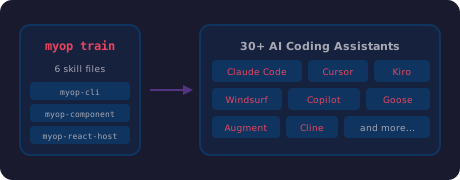
## myop train — Install AI Agent Skills
```bash
npx myop train
```
This installs SKILL.md files into your project's AI agent directories. Skills teach coding assistants how to build Myop components, use the CLI, and integrate with host frameworks.
### What it installs
Skills are installed using the [Agent Skills standard](https://www.npmjs.com/package/skills), which supports **30+ AI coding assistants**:
- **Claude Code** — `.claude/skills/`
- **Cursor** — `.cursor/skills/`
- **Windsurf** — `.windsurf/skills/`
- **VS Code Copilot** — `.github/copilot/skills/`
- **Kiro** — `.kiro/skills/`
- **Goose** — `.goose/skills/`
- **Augment** — `.augment/skills/`
- **Cline** — `.cline/skills/`
- And many more
### Skills included
| Skill | What the AI learns |
|-------|--------------------|
| **myop-cli** | All CLI commands, workflows, `myop.config.json` structure, dev server usage |
| **myop-component** | Public API (`myop_init_interface`, `myop_cta_handler`), type definitions, sizing, layout, single-file vs multi-file architecture, common mistakes |
| **myop-react-host** | `` in React, typed event handlers (`onItemSelected`), data binding, preloading, auto-generated packages, `enableLocalDev()` |
| **myop-vue-host** | `` in Vue 3, `@cta` events, slots, deep-watched data, `enableLocalDev()` |
| **myop-angular-host** | `` in Angular, standalone component, `(cta)` output, content projection, `enableLocalDev()` |
| **myop-react-native-host** | `` in React Native, WebView bridge, native props (scroll, zoom, selection), device setup |
### Smart framework detection
`myop train` reads your `package.json` and installs only the relevant host skills:
| Detected dependency | Host skill installed |
|--------------------|---------------------|
| `react` or `@myop/react` | `myop-react-host` |
| `vue` or `@myop/vue` | `myop-vue-host` |
| `@angular/core` or `@myop/angular` | `myop-angular-host` |
| `react-native` or `@myop/react-native` | `myop-react-native-host` |
| No framework detected | All host skills |
The core skills (`myop-cli` and `myop-component`) are always installed.
### When to run it
- After cloning a Myop project — `npx myop train`
- After adding a new framework — `npx myop train` (picks up new deps)
- After updating the CLI — `npx myop train` (gets latest skill content)
- During `myop create` — skills are installed automatically
### Example output
```
$ npx myop train
✔ AI agent skills installed
Detected: react, @myop/react
Skills: myop-cli, myop-component, myop-react-host
```
### What the AI can do after training
With skills installed, your AI coding assistant can:
- **Create new components** — correctly scaffold `index.html` with `myop_init_interface`, `myop_cta_handler`, type definitions, preview data, and proper IIFE encapsulation
- **Edit existing components** — understand the public API contract and maintain correct patterns
- **Integrate into host apps** — use the right SDK component (``) with correct props, events, and configuration
- **Run CLI commands** — know the correct package name (`npx myop`), command syntax, and workflows
- **Set up local dev** — configure `enableLocalDev()`, start the dev server, set up monorepo mode
---
## myop mcp — Configure MCP Server
```bash
npx myop mcp
```
The Myop MCP (Model Context Protocol) server gives your AI coding assistant direct access to the Myop platform — uploading components, listing components, reading source code, and more.
### Supported assistants
| Assistant | Config location |
|-----------|----------------|
| **Claude Code** | `~/.claude.json` |
| **Cursor** | `~/.cursor/mcp.json` |
| **Windsurf** | `~/.codeium/windsurf/mcp_config.json` |
| **VS Code Copilot** | OS-specific VS Code settings |
### Setup
1. Run `npx myop mcp`
2. Select your AI coding assistant
3. The CLI writes the MCP server configuration to the correct file
4. Restart your assistant
5. Authenticate (the assistant will prompt you to sign in via browser)
### What the MCP server provides
Once configured, your AI assistant can:
- **Upload components** — push HTML directly to the Myop platform
- **List components** — browse your organization's components
- **Read component source** — fetch the latest HTML of any component by ID
- **Manage organizations** — list available organizations
### Example flow
After running `npx myop mcp` for Claude Code:
```
✔ Myop MCP configured for Claude Code
Config: ~/.claude.json
Server: https://mcp.myop.dev/mcp
Next steps:
Restart Claude Code to pick up the new MCP config.
Type /mcp to see all MCP servers and verify "myop" is listed.
Select "Authenticate" next to myop — your browser will open
to sign in with your Myop account (OAuth).
```
---
## Recommended Setup
For the best AI-assisted development experience, run both commands:
```bash
# 1. Install skills (teaches the AI about Myop)
npx myop train
# 2. Configure MCP (gives the AI access to Myop platform tools)
npx myop mcp
```
Skills teach the AI **how** to build Myop components correctly. The MCP server gives it **access** to upload, download, and manage them.