---
sidebar_position: 3
title: Component Development
description: Build Myop components using the public API — myop_init_interface for receiving data and myop_cta_handler for sending events. Learn type definitions, sizing, preview data, and single-file vs multi-file architectures.
keywords: [myop component, myop_init_interface, myop_cta_handler, myop types, myop html component, build myop component, myop public api]
---
# Component Development

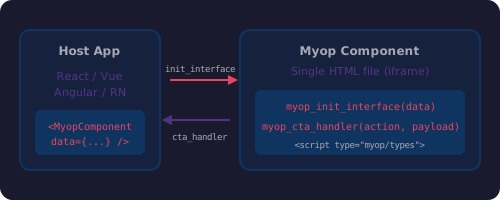
A Myop component is an isolated, independently deployable UI module. It runs inside an iframe managed by the host SDK (`@myop/react`, `@myop/vue`, `@myop/angular`, or `@myop/react-native`). The component communicates with the host through exactly **2 global functions**.

<div style={{textAlign: 'center', margin: '24px 0'}}>
  <img src="/img/cli/component-api.svg" alt="Myop component public API diagram" width="500" />
</div>

## The Public API

| Function | Direction | Purpose |
|----------|-----------|---------|
| `myop_init_interface(data)` | Host → Component | Receive data, render UI |
| `myop_cta_handler(action, payload)` | Component → Host | Send user actions back |

### myop_init_interface

Called by the host to pass data into the component:

```javascript
window.myop_init_interface = function(data) {
    if (!data) return currentState;  // Getter mode
    render(data);                     // Setter mode
};
```

- **With argument** — the host is sending data. Render your UI.
- **Without argument** — the host is reading current state. Return the last data received.

### myop_cta_handler

Called by the component to send events to the host:

```javascript
window.myop_cta_handler('item-selected', { itemId: '123' });
window.myop_cta_handler('form-submitted', { name: 'John', email: 'john@example.com' });
```

The host receives these events via props/events on the SDK component (e.g., `on` prop in React, `@cta` event in Vue).

## Type Definitions

Define TypeScript interfaces in a `<script type="myop/types">` block in the HTML `<head>`:

```html
<script type="myop/types">
interface MyopInitData {
    title: string;
    items: Array<{ id: string; label: string }>;
}

interface MyopCtaPayloads {
    'item-selected': { itemId: string };
    'form-submitted': { name: string; email: string };
    'size-requested': {
        width?: number | null;
        height?: number | null;
        minWidth?: number | null;
        maxWidth?: number | null;
        minHeight?: number | null;
        maxHeight?: number | null;
        required?: boolean;
    };
}

declare function myop_init_interface(): MyopInitData;
declare function myop_init_interface(data: MyopInitData): void;
declare function myop_cta_handler<K extends keyof MyopCtaPayloads>(
    action: K, payload: MyopCtaPayloads[K]
): void;
</script>
```

These types are used by:
- **Auto-generated packages** — `npm install https://cloud.myop.dev/npm/{componentId}/react` generates fully typed React/Vue/Angular components from these definitions
- **AI coding assistants** — skills use these types to provide accurate autocompletion and documentation

## Sizing

Set the default size in a `<meta>` tag:

```html
<meta name="myop:size" content='{"width":"100%","height":"100%"}'>
```

Components can request a resize at runtime using the `size-requested` CTA:

```javascript
myop_cta_handler('size-requested', {
    width: 400,
    height: 300,
    minWidth: 200,
    maxWidth: 800
});
```

## Preview Data

Add a `<script id="myop_preview">` to show sample data when opening the component directly (outside a host app):

```html
<script id="myop_preview">
    window.myop_init_interface({
        title: 'Sample Title',
        items: [
            { id: '1', label: 'First item' },
            { id: '2', label: 'Second item' }
        ]
    });
</script>
```

This script is stripped when the component runs inside a host application.

## Complete Example

```html
<!DOCTYPE html>
<html lang="en">
<head>
    <meta charset="UTF-8">
    <meta name="viewport" content="width=device-width, initial-scale=1.0">
    <meta name="myop:size" content='{"width":"100%","height":"100%"}'>
    <title>Task List</title>
    <script type="myop/types">
    interface MyopInitData {
        title: string;
        tasks: Array<{ id: string; label: string; completed: boolean }>;
    }

    interface MyopCtaPayloads {
        'task-toggled': { taskId: string; completed: boolean };
        'task-deleted': { taskId: string };
    }

    declare function myop_init_interface(): MyopInitData;
    declare function myop_init_interface(data: MyopInitData): void;
    declare function myop_cta_handler<K extends keyof MyopCtaPayloads>(
        action: K, payload: MyopCtaPayloads[K]
    ): void;
    </script>
    <style>
        * { box-sizing: border-box; margin: 0; padding: 0; }
        html, body { width: 100%; height: 100%; overflow: hidden;
            font-family: -apple-system, BlinkMacSystemFont, 'Segoe UI', Roboto, sans-serif;
        }
        #app-root { width: 100%; height: 100%; padding: 16px; }
        h2 { margin-bottom: 12px; }
        .task { padding: 8px; border-bottom: 1px solid #eee; cursor: pointer; display: flex; align-items: center; gap: 8px; }
        .task.completed { text-decoration: line-through; opacity: 0.6; }
        .delete-btn { margin-left: auto; color: #e74c3c; cursor: pointer; background: none; border: none; font-size: 16px; }
    </style>
</head>
<body>
    <div id="app-root"></div>

    <script>
    (function() {
        var state = {};

        function render(data) {
            state = data;
            var root = document.getElementById('app-root');
            root.innerHTML =
                '<h2>' + (data.title || '') + '</h2>' +
                (data.tasks || []).map(function(task) {
                    return '<div class="task ' + (task.completed ? 'completed' : '') + '" data-id="' + task.id + '">' +
                        '<span>' + task.label + '</span>' +
                        '<button class="delete-btn" data-delete="' + task.id + '">&times;</button>' +
                    '</div>';
                }).join('');
        }

        window.myop_init_interface = function(data) {
            if (!data) return state;
            render(data);
        };

        window.myop_cta_handler = function(action, payload) {
            // Overridden by host application
        };

        document.getElementById('app-root').addEventListener('click', function(e) {
            var deleteBtn = e.target.closest('.delete-btn');
            if (deleteBtn) {
                e.stopPropagation();
                window.myop_cta_handler('task-deleted', { taskId: deleteBtn.dataset.delete });
                return;
            }
            var task = e.target.closest('.task');
            if (task) {
                var id = task.dataset.id;
                var isCompleted = task.classList.contains('completed');
                window.myop_cta_handler('task-toggled', { taskId: id, completed: !isCompleted });
            }
        });
    })();
    </script>

    <script id="myop_preview">
        window.myop_init_interface({
            title: 'My Tasks',
            tasks: [
                { id: '1', label: 'Review pull request', completed: false },
                { id: '2', label: 'Update documentation', completed: true },
                { id: '3', label: 'Deploy to production', completed: false }
            ]
        });
    </script>
</body>
</html>
```

## Rules

1. **Both functions must be defined at top-level script execution** — never inside `setTimeout`, `Promise.then`, `async`, `DOMContentLoaded`, or any deferred code
2. **Rendering must be synchronous** — no `fetch`, no `await`, no `setTimeout` inside `myop_init_interface`
3. **All state is private** — use an IIFE to encapsulate; only expose the 2 global functions
4. **Single entry point** — the deployed artifact is one HTML file with all CSS/JS inlined
5. **No external network requests** — components cannot fetch external resources at runtime

## Single-File vs Multi-File

### Single-file (recommended for most components)

Everything in one `index.html`. No build step needed.

```
my-component/
├── index.html          # All HTML, CSS, JS
└── myop.config.json
```

### Multi-file (for complex components)

Use any internal architecture — modules, state management, third-party libraries:

```
my-component/
├── index.html          # HTML template
├── src/
│   ├── index.js
│   ├── modules/
│   └── styles/
├── build.js            # Bundler (compiles into dist/index.html)
├── dist/
│   └── index.html      # Built entry point (deployed)
├── package.json
└── myop.config.json
```

The build step compiles all source files into a single `dist/index.html` that gets deployed.

## Common Mistakes

| Wrong | Correct |
|-------|---------|
| Defining functions inside `DOMContentLoaded` | Defining in top-level `<script>` |
| `await fetch()` inside `myop_init_interface` | Pure synchronous DOM manipulation |
| Global variables on `window` | Variables inside IIFE closure |
| Multiple `appendChild` calls | Single `innerHTML` write |
| Not returning state when called without args | `if (!data) return state;` pattern |
