---
sidebar_position: 4
title: Dev Server & Local Development
description: Use myop dev to start a local development server with hot reload on port 9292. Supports single-file and multi-file components, monorepo mode for multiple components, and a management dashboard on port 9293.
keywords: [myop dev, myop dev server, myop hot reload, myop hmr, myop local development, myop monorepo, myop port 9292]
---
# Dev Server & Local Development
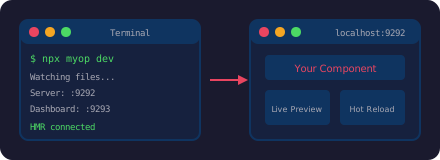
The `myop dev` command starts a local development server with file watching and hot module replacement (HMR).
## Starting the Dev Server
```bash
npx myop dev
```
| URL | Purpose |
|-----|---------|
| `http://localhost:9292` | Dev server — component preview |
| `http://localhost:9293` | Management dashboard |
## How It Works
### Single-file mode
If the project has only `index.html` (no `package.json` with a build script), the dev server serves the file directly. Edits to `index.html` trigger an instant HMR update — no build step.
### Multi-file mode
If the project has a build script, the dev server watches source files and triggers builds automatically:
- If `build.js` exists → runs `node build.js`
- If `package.json` has a `build` script → runs `npm run build`
The built `dist/index.html` is served and refreshed after each build.
### File watching
The dev server watches for changes to `.js`, `.css`, and `.html` files. When a change is detected, it either refreshes the served file (single-file mode) or triggers a rebuild (multi-file mode).
## Monorepo Mode
When working with multiple components in a monorepo, use the `-m` flag:
```bash
npx myop dev -m
```
This scans for all `myop.config.json` files in nested directories (up to 3 levels deep) and presents a checkbox menu to select which components to serve simultaneously.
### .myop-monorepo.json
Selected components are saved to `.myop-monorepo.json` so you don't have to pick them every time:
```json
{
"selectedComponents": [
"./packages/components/sidebar",
"./packages/components/chart"
],
"lastUpdated": "2025-01-15T10:30:00.000Z"
}
```
## Connecting to a Host App
To point your host app (React, Vue, Angular, React Native) at the local dev server instead of the Myop cloud:
### React
```tsx
import { enableLocalDev } from "@myop/react";
enableLocalDev(); // All instances load from localhost:9292
```
### Vue
```ts
import { enableLocalDev } from "@myop/vue";
enableLocalDev();
```
### Angular
```ts
import { enableLocalDev } from "@myop/angular";
enableLocalDev();
```
### React Native
```tsx
import { enableLocalDev } from "@myop/react-native";
enableLocalDev();
// Android emulator:
// import { setCloudRepositoryUrl } from "@myop/react-native";
// setCloudRepositoryUrl("http://10.0.2.2:9292");
// Physical device:
// setCloudRepositoryUrl("http://192.168.1.100:9292");
```
Now edits to component source files are reflected instantly in your host app.
:::tip
Remember to remove or comment out `enableLocalDev()` before deploying your host app to production.
:::
## Management Dashboard
Access the management dashboard at **http://localhost:9293** for a real-time overview of your dev environment:
.default}) ### Network Architecture
The network diagram visualizes how requests flow through the dev server — from your host app, through the local server for registered components, and proxied to `cloud.myop.dev` for everything else:
### Network Architecture
The network diagram visualizes how requests flow through the dev server — from your host app, through the local server for registered components, and proxied to `cloud.myop.dev` for everything else:
.default}) ### Registered Components
The panel shows all components currently served by the dev server, with their IDs, names, and local paths:
### Registered Components
The panel shows all components currently served by the dev server, with their IDs, names, and local paths:
.default}) ## Working on Existing Components Locally
When you need to modify a component that's already deployed:
```bash
# 1. Pull the component source
mkdir components/sidebar && cd components/sidebar
npx myop pull
# 2. Start the dev server
npx myop dev
# 3. Enable local dev in your host app (see above)
# 4. Edit index.html — changes reflect instantly
# 5. Push when done
npx myop push
```
### Multiple components
```bash
mkdir -p components && cd components
npx myop pull -o sidebar/index.html
npx myop pull -o chart/index.html
npx myop dev -m # Monorepo mode
```
## Working on Existing Components Locally
When you need to modify a component that's already deployed:
```bash
# 1. Pull the component source
mkdir components/sidebar && cd components/sidebar
npx myop pull
# 2. Start the dev server
npx myop dev
# 3. Enable local dev in your host app (see above)
# 4. Edit index.html — changes reflect instantly
# 5. Push when done
npx myop push
```
### Multiple components
```bash
mkdir -p components && cd components
npx myop pull -o sidebar/index.html
npx myop pull -o chart/index.html
npx myop dev -m # Monorepo mode
```