Generic Webhook Integration
For CI/CD systems other than GitHub Actions (Jenkins, GitLab CI, CircleCI, or a custom server), use a generic webhook. Myop sends a signed POST request to your endpoint whenever a component is released.
How It Works
Release component in dashboard
        │
        ▼
Myop sends POST to your URL ──► Your server / CI endpoint
  (signed with HMAC-SHA256)              │
                                  Verify signature
                                         │
                                  npx myop export --releases '...'
                                         │
                                  Deploy to CDN
Setup
Step 1: Add a Webhook URL
- Go to Dashboard > Rollout > Settings (gear icon) > Self-Hosting
- Enable self-hosted sync
- Enter your endpoint URL and click Add
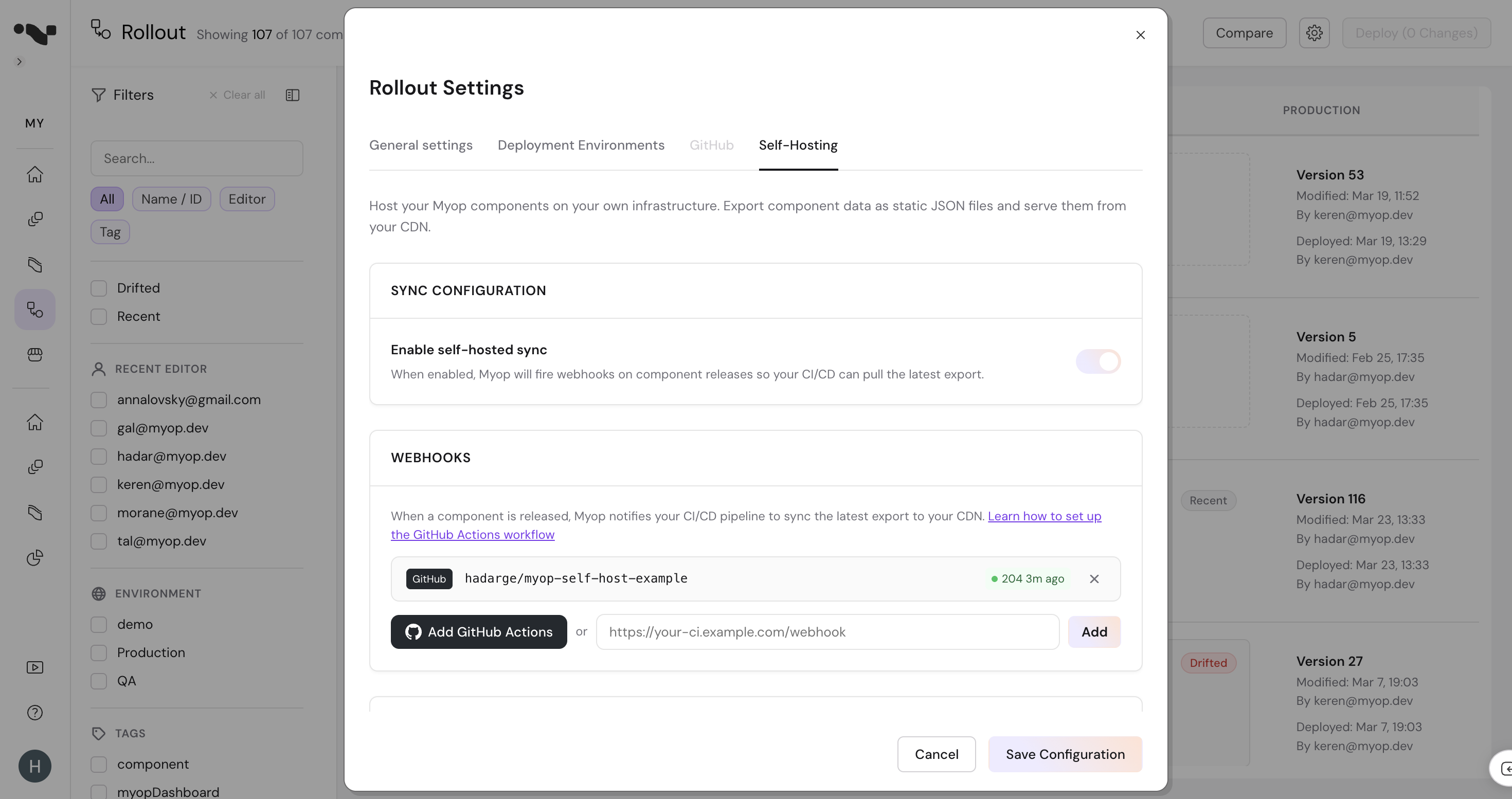
- Copy the signing secret — it's only shown once. You'll use this to verify that webhook requests are really from Myop.
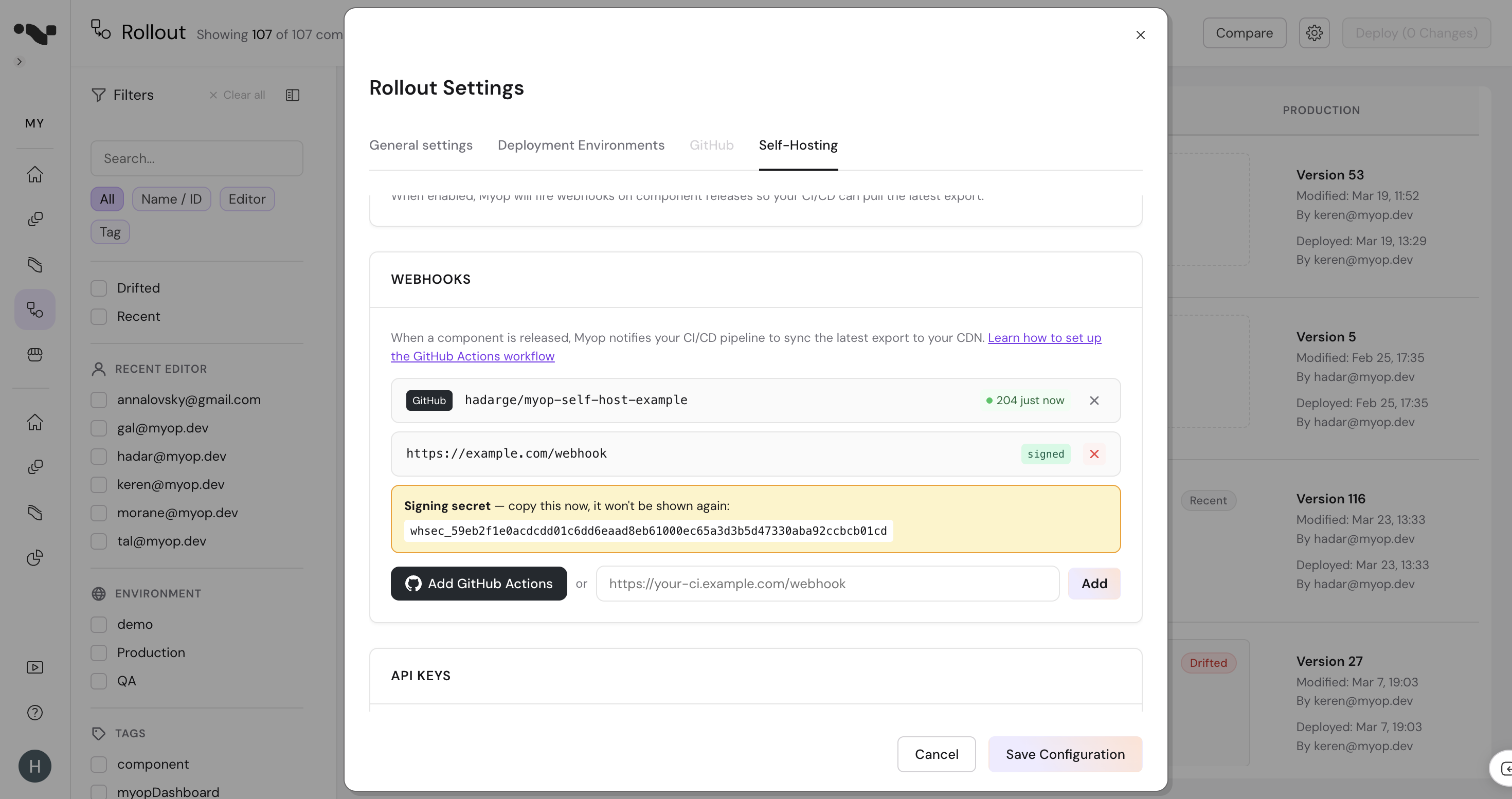
- Click Save Configuration
Step 2: Build Your Webhook Receiver
Your endpoint receives a POST request with the following format:
Headers:
| Header | Value |
|---|---|
Content-Type | application/json |
X-Myop-Event | components.deployed |
X-Myop-Signature | sha256=<hex-encoded HMAC> |
Body:
{
  "event": "components.deployed",
  "timestamp": "2026-03-24T13:37:00.000Z",
  "organizationId": "org-abc-123",
  "data": {
    "releases": [
      {
        "componentId": "2098cfba-5124-48ff-b87d-6cd71c14cf7a",
        "variantId": "57a5c9ef-8775-4a19-a243-4cadb87a3e6f",
        "environment": "production",
        "environmentId": "d6c518e0-f80b-4cbe-9efd-b51aa37f2324"
      }
    ]
  }
}
Step 3: Verify the Signature
Always verify the X-Myop-Signature header to ensure the request is from Myop. The signature is an HMAC-SHA256 hash of the raw request body using your signing secret.
const crypto = require('crypto');

function verifySignature(rawBody, signature, secret) {
  const expected = 'sha256=' + crypto
    .createHmac('sha256', secret)
    .update(rawBody)
    .digest('hex');

  return crypto.timingSafeEqual(
    Buffer.from(signature),
    Buffer.from(expected)
  );
}

app.post('/webhooks/myop', express.raw({ type: 'application/json' }), (req, res) => {
  const signature = req.headers['x-myop-signature'];

  if (!verifySignature(req.body, signature, process.env.MYOP_WEBHOOK_SECRET)) {
    return res.status(401).send('Invalid signature');
  }

  const payload = JSON.parse(req.body);
  // Trigger your sync pipeline...
  res.sendStatus(200);
});
import hmac
import hashlib

def verify_signature(body: bytes, signature: str, secret: str) -> bool:
    expected = 'sha256=' + hmac.new(
        secret.encode(), body, hashlib.sha256
    ).hexdigest()
    return hmac.compare_digest(signature, expected)

@app.route('/webhooks/myop', methods=['POST'])
def handle_webhook():
    signature = request.headers.get('X-Myop-Signature', '')
    if not verify_signature(request.data, signature, WEBHOOK_SECRET):
        return 'Invalid signature', 401

    payload = request.json
    # Trigger your sync pipeline...
    return '', 200
Step 4: Run the Export
After verifying the signature, extract the releases array from the payload and pass it to the Myop CLI:
npx myop export \
  --api-key "$MYOP_API_KEY" \
  --releases '[{"componentId":"2098cfba-...","environment":"production","environmentId":"d6c518e0-...","variantId":"57a5c9ef-..."}]'
The --releases flag tells the CLI to export only the specific component+environment that changed, making the sync fast.
For a full sync (e.g., on schedule or when data.fullSync is true):
npx myop export --api-key "$MYOP_API_KEY"
Step 5: Deploy to CDN
Upload the exported files to your CDN:
aws s3 sync ./myop-static s3://your-bucket \
  --delete \
  --cache-control "public, max-age=300"
Complete Example: Express Server
A minimal webhook receiver that verifies signatures and triggers a sync:
const express = require('express');
const crypto = require('crypto');
const { execSync } = require('child_process');

const app = express();
const WEBHOOK_SECRET = process.env.MYOP_WEBHOOK_SECRET;
const MYOP_API_KEY = process.env.MYOP_API_KEY;

app.post('/webhooks/myop', express.raw({ type: 'application/json' }), (req, res) => {
  // 1. Verify signature
  const signature = req.headers['x-myop-signature'];
  const expected = 'sha256=' + crypto
    .createHmac('sha256', WEBHOOK_SECRET)
    .update(req.body)
    .digest('hex');

  if (!crypto.timingSafeEqual(Buffer.from(signature), Buffer.from(expected))) {
    console.error('Invalid webhook signature');
    return res.status(401).send('Invalid signature');
  }

  // 2. Parse payload
  const payload = JSON.parse(req.body);
  const releases = payload.data?.releases;
  console.log(`Received ${releases?.length || 0} release(s)`);

  // 3. Run export
  try {
    if (releases && releases.length > 0) {
      execSync(`npx myop export --releases '${JSON.stringify(releases)}'`, {
        env: { ...process.env, MYOP_API_KEY },
        stdio: 'inherit'
      });
    } else {
      execSync('npx myop export', {
        env: { ...process.env, MYOP_API_KEY },
        stdio: 'inherit'
      });
    }

    // 4. Deploy (replace with your CDN upload command)
    execSync('aws s3 sync ./myop-static s3://your-bucket --delete', {
      stdio: 'inherit'
    });

    res.sendStatus(200);
  } catch (err) {
    console.error('Sync failed:', err.message);
    res.status(500).send('Sync failed');
  }
});

app.listen(3000, () => console.log('Webhook receiver listening on port 3000'));
CI/CD Examples
GitLab CI
Use a GitLab webhook trigger to start a pipeline:
sync-myop:
  stage: deploy
  image: node:20
  script:
    - npx myop export
    - aws s3 sync ./myop-static s3://$AWS_S3_BUCKET --delete
  only:
    - triggers
Set your webhook URL to https://gitlab.com/api/v4/projects/{id}/trigger/pipeline and pass the trigger token as a query parameter.
Jenkins
Configure a Generic Webhook Trigger plugin on your Jenkins job. Set the webhook URL to your Jenkins endpoint and extract $.data.releases from the payload.
Retry Policy
Webhooks are delivered with a 10-second timeout. If your endpoint doesn't respond in time, the delivery is marked as failed. Myop does not retry failed webhooks — use a scheduled full sync as a fallback to catch any missed deliveries.
Testing
Click Sync Now in the Self-Hosting settings to trigger a test delivery. Check the webhook status indicator to confirm your endpoint received it successfully.