AI Integration
The Myop CLI includes two commands for AI coding assistants: myop train installs skill files so assistants understand Myop conventions, and myop mcp configures the Myop MCP server for component management.
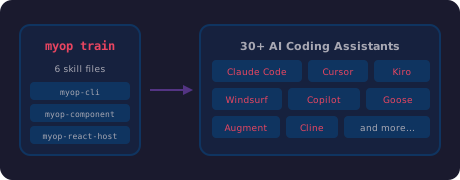
myop train — Install AI Agent Skills
npx myop train
This installs SKILL.md files into your project's AI agent directories. Skills teach coding assistants how to build Myop components, use the CLI, and integrate with host frameworks.
What it installs
Skills are installed using the Agent Skills standard, which supports 30+ AI coding assistants:
- Claude Code —
.claude/skills/ - Cursor —
.cursor/skills/ - Windsurf —
.windsurf/skills/ - VS Code Copilot —
.github/copilot/skills/ - Kiro —
.kiro/skills/ - Goose —
.goose/skills/ - Augment —
.augment/skills/ - Cline —
.cline/skills/ - And many more
Skills included
| Skill | What the AI learns |
|---|---|
| myop-cli | All CLI commands, workflows, myop.config.json structure, dev server usage |
| myop-component | Public API (myop_init_interface, myop_cta_handler), type definitions, sizing, layout, single-file vs multi-file architecture, common mistakes |
| myop-react-host | <MyopComponent> in React, typed event handlers (onItemSelected), data binding, preloading, auto-generated packages, enableLocalDev() |
| myop-vue-host | <MyopComponent> in Vue 3, @cta events, slots, deep-watched data, enableLocalDev() |
| myop-angular-host | <myop-component> in Angular, standalone component, (cta) output, content projection, enableLocalDev() |
| myop-react-native-host | <MyopComponent> in React Native, WebView bridge, native props (scroll, zoom, selection), device setup |
Smart framework detection
myop train reads your package.json and installs only the relevant host skills:
| Detected dependency | Host skill installed |
|---|---|
react or @myop/react | myop-react-host |
vue or @myop/vue | myop-vue-host |
@angular/core or @myop/angular | myop-angular-host |
react-native or @myop/react-native | myop-react-native-host |
| No framework detected | All host skills |
The core skills (myop-cli and myop-component) are always installed.
When to run it
- After cloning a Myop project —
npx myop train - After adding a new framework —
npx myop train(picks up new deps) - After updating the CLI —
npx myop train(gets latest skill content) - During
myop create— skills are installed automatically
Example output
$ npx myop train
✔ AI agent skills installed
   Detected: react, @myop/react
   Skills: myop-cli, myop-component, myop-react-host
What the AI can do after training
With skills installed, your AI coding assistant can:
- Create new components — correctly scaffold
index.htmlwithmyop_init_interface,myop_cta_handler, type definitions, preview data, and proper IIFE encapsulation - Edit existing components — understand the public API contract and maintain correct patterns
- Integrate into host apps — use the right SDK component (
<MyopComponent>) with correct props, events, and configuration - Run CLI commands — know the correct package name (
npx myop), command syntax, and workflows - Set up local dev — configure
enableLocalDev(), start the dev server, set up monorepo mode
myop mcp — Configure MCP Server
npx myop mcp
The Myop MCP (Model Context Protocol) server gives your AI coding assistant direct access to the Myop platform — uploading components, listing components, reading source code, and more.
Supported assistants
| Assistant | Config location |
|---|---|
| Claude Code | ~/.claude.json |
| Cursor | ~/.cursor/mcp.json |
| Windsurf | ~/.codeium/windsurf/mcp_config.json |
| VS Code Copilot | OS-specific VS Code settings |
Setup
- Run
npx myop mcp - Select your AI coding assistant
- The CLI writes the MCP server configuration to the correct file
- Restart your assistant
- Authenticate (the assistant will prompt you to sign in via browser)
What the MCP server provides
Once configured, your AI assistant can:
- Upload components — push HTML directly to the Myop platform
- List components — browse your organization's components
- Read component source — fetch the latest HTML of any component by ID
- Manage organizations — list available organizations
Example flow
After running npx myop mcp for Claude Code:
✔ Myop MCP configured for Claude Code
  Config:  ~/.claude.json
  Server:  https://mcp.myop.dev/mcp

  Next steps:
  Restart Claude Code to pick up the new MCP config.
  Type /mcp to see all MCP servers and verify "myop" is listed.
  Select "Authenticate" next to myop — your browser will open
  to sign in with your Myop account (OAuth).
Recommended Setup
For the best AI-assisted development experience, run both commands:
# 1. Install skills (teaches the AI about Myop)
npx myop train

# 2. Configure MCP (gives the AI access to Myop platform tools)
npx myop mcp
Skills teach the AI how to build Myop components correctly. The MCP server gives it access to upload, download, and manage them.