Component Development
A Myop component is an isolated, independently deployable UI module. It runs inside an iframe managed by the host SDK (@myop/react, @myop/vue, @myop/angular, or @myop/react-native). The component communicates with the host through exactly 2 global functions.
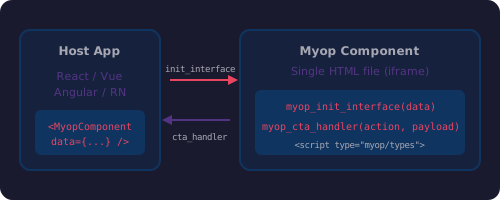
The Public API
| Function | Direction | Purpose |
|---|---|---|
myop_init_interface(data) | Host → Component | Receive data, render UI |
myop_cta_handler(action, payload) | Component → Host | Send user actions back |
myop_init_interface
Called by the host to pass data into the component:
window.myop_init_interface = function(data) {
    if (!data) return currentState;  // Getter mode
    render(data);                     // Setter mode
};
- With argument — the host is sending data. Render your UI.
- Without argument — the host is reading current state. Return the last data received.
myop_cta_handler
Called by the component to send events to the host:
window.myop_cta_handler('item-selected', { itemId: '123' });
window.myop_cta_handler('form-submitted', { name: 'John', email: 'john@example.com' });
The host receives these events via props/events on the SDK component (e.g., on prop in React, @cta event in Vue).
Type Definitions
Define TypeScript interfaces in a <script type="myop/types"> block in the HTML <head>:
<script type="myop/types">
interface MyopInitData {
    title: string;
    items: Array<{ id: string; label: string }>;
}

interface MyopCtaPayloads {
    'item-selected': { itemId: string };
    'form-submitted': { name: string; email: string };
    'size-requested': {
        width?: number | null;
        height?: number | null;
        minWidth?: number | null;
        maxWidth?: number | null;
        minHeight?: number | null;
        maxHeight?: number | null;
        required?: boolean;
    };
}

declare function myop_init_interface(): MyopInitData;
declare function myop_init_interface(data: MyopInitData): void;
declare function myop_cta_handler<K extends keyof MyopCtaPayloads>(
    action: K, payload: MyopCtaPayloads[K]
): void;
</script>
These types are used by:
- Auto-generated packages —
npm install https://cloud.myop.dev/npm/{componentId}/reactgenerates fully typed React/Vue/Angular components from these definitions - AI coding assistants — skills use these types to provide accurate autocompletion and documentation
Sizing
Set the default size in a <meta> tag:
<meta name="myop:size" content='{"width":"100%","height":"100%"}'>
Components can request a resize at runtime using the size-requested CTA:
myop_cta_handler('size-requested', {
    width: 400,
    height: 300,
    minWidth: 200,
    maxWidth: 800
});
Preview Data
Add a <script id="myop_preview"> to show sample data when opening the component directly (outside a host app):
<script id="myop_preview">
    window.myop_init_interface({
        title: 'Sample Title',
        items: [
            { id: '1', label: 'First item' },
            { id: '2', label: 'Second item' }
        ]
    });
</script>
This script is stripped when the component runs inside a host application.
Complete Example
<!DOCTYPE html>
<html lang="en">
<head>
<meta charset="UTF-8">
<meta name="viewport" content="width=device-width, initial-scale=1.0">
<meta name="myop:size" content='{"width":"100%","height":"100%"}'>
<title>Task List</title>
<script type="myop/types">
interface MyopInitData {
title: string;
tasks: Array<{ id: string; label: string; completed: boolean }>;
}
interface MyopCtaPayloads {
'task-toggled': { taskId: string; completed: boolean };
'task-deleted': { taskId: string };
}
declare function myop_init_interface(): MyopInitData;
declare function myop_init_interface(data: MyopInitData): void;
declare function myop_cta_handler<K extends keyof MyopCtaPayloads>(
action: K, payload: MyopCtaPayloads[K]
): void;
</script>
<style>
* { box-sizing: border-box; margin: 0; padding: 0; }
html, body { width: 100%; height: 100%; overflow: hidden;
font-family: -apple-system, BlinkMacSystemFont, 'Segoe UI', Roboto, sans-serif;
}
#app-root { width: 100%; height: 100%; padding: 16px; }
h2 { margin-bottom: 12px; }
.task { padding: 8px; border-bottom: 1px solid #eee; cursor: pointer; display: flex; align-items: center; gap: 8px; }
.task.completed { text-decoration: line-through; opacity: 0.6; }
.delete-btn { margin-left: auto; color: #e74c3c; cursor: pointer; background: none; border: none; font-size: 16px; }
</style>
</head>
<body>
<div id="app-root"></div>
<script>
(function() {
var state = {};
function render(data) {
state = data;
var root = document.getElementById('app-root');
root.innerHTML =
'<h2>' + (data.title || '') + '</h2>' +
(data.tasks || []).map(function(task) {
return '<div class="task ' + (task.completed ? 'completed' : '') + '" data-id="' + task.id + '">' +
'<span>' + task.label + '</span>' +
'<button class="delete-btn" data-delete="' + task.id + '">×</button>' +
'</div>';
}).join('');
}
window.myop_init_interface = function(data) {
if (!data) return state;
render(data);
};
window.myop_cta_handler = function(action, payload) {
// Overridden by host application
};
document.getElementById('app-root').addEventListener('click', function(e) {
var deleteBtn = e.target.closest('.delete-btn');
if (deleteBtn) {
e.stopPropagation();
window.myop_cta_handler('task-deleted', { taskId: deleteBtn.dataset.delete });
return;
}
var task = e.target.closest('.task');
if (task) {
var id = task.dataset.id;
var isCompleted = task.classList.contains('completed');
window.myop_cta_handler('task-toggled', { taskId: id, completed: !isCompleted });
}
});
})();
</script>
<script id="myop_preview">
window.myop_init_interface({
title: 'My Tasks',
tasks: [
{ id: '1', label: 'Review pull request', completed: false },
{ id: '2', label: 'Update documentation', completed: true },
{ id: '3', label: 'Deploy to production', completed: false }
]
});
</script>
</body>
</html>
Rules
- Both functions must be defined at top-level script execution — never inside
setTimeout,Promise.then,async,DOMContentLoaded, or any deferred code - Rendering must be synchronous — no
fetch, noawait, nosetTimeoutinsidemyop_init_interface - All state is private — use an IIFE to encapsulate; only expose the 2 global functions
- Single entry point — the deployed artifact is one HTML file with all CSS/JS inlined
- No external network requests — components cannot fetch external resources at runtime
Single-File vs Multi-File
Single-file (recommended for most components)
Everything in one index.html. No build step needed.
my-component/
├── index.html          # All HTML, CSS, JS
└── myop.config.json
Multi-file (for complex components)
Use any internal architecture — modules, state management, third-party libraries:
my-component/
├── index.html          # HTML template
├── src/
│   ├── index.js
│   ├── modules/
│   └── styles/
├── build.js            # Bundler (compiles into dist/index.html)
├── dist/
│   └── index.html      # Built entry point (deployed)
├── package.json
└── myop.config.json
The build step compiles all source files into a single dist/index.html that gets deployed.
Common Mistakes
| Wrong | Correct |
|---|---|
Defining functions inside DOMContentLoaded | Defining in top-level <script> |
await fetch() inside myop_init_interface | Pure synchronous DOM manipulation |
Global variables on window | Variables inside IIFE closure |
Multiple appendChild calls | Single innerHTML write |
| Not returning state when called without args | if (!data) return state; pattern |